

If you are a solopreneur or one-person company, your website is not just a digital business card. It needs to explain what you sell, build trust quickly, and give visitors a clear way to buy, book, or contact you.
Many people start by asking how to make a website to sell stuff, how to create a website to sell products, or what they need to sell products online. The answer is not only "choose a website builder." You need a clear offer, a sensible page structure, payment setup, basic legal pages, and a simple path that brings the right visitors to the right page.
This guide walks through the practical steps to build a website that can sell products, services, digital downloads, consulting packages, or simple items online — without overcomplicating it.
What do you need to sell products online?
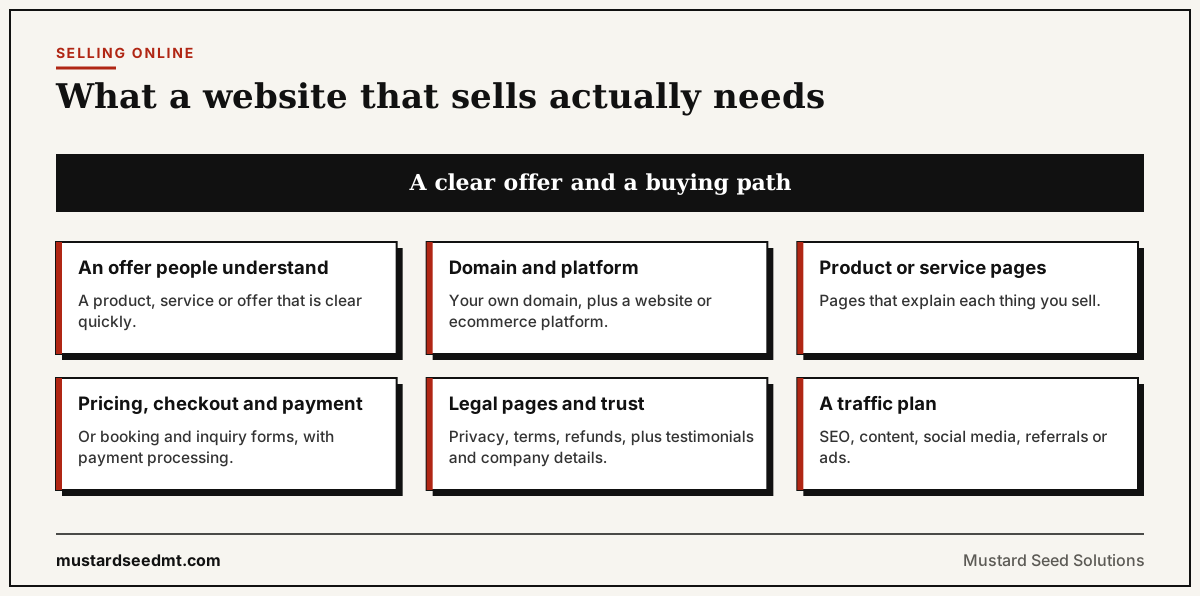
Before choosing a platform, get the business basics clear. A selling website needs more than attractive design. It needs a clear offer and a buying path.
You need:
- A product, service, or offer people can understand quickly
- A domain name, such as yourbusiness.com
- A website platform or ecommerce platform
- Product or service pages
- Pricing and checkout, booking, or inquiry forms
- Payment processing
- Basic legal pages — privacy policy, terms, and refund policy
- Trust signals — testimonials, company details, case studies, or founder information
- A plan to get traffic through SEO, content, social media, referrals, or ads
For a solopreneur, the best website is not always the most complex one. A simple website that explains the offer clearly and makes the next step obvious will usually perform better than a beautiful website that leaves visitors confused.
Step 1: Decide what kind of website you need
Not every selling website needs a full ecommerce store. The right structure depends on what you sell.
Physical products: You probably need product pages, inventory management, shipping settings, tax settings, and checkout. Shopify, WooCommerce, Wix, and Squarespace can support this.
Services: You may need a service page, pricing packages, booking form, contact form, and case studies. A consultant, designer, marketer, coach, or freelancer may not need a shopping cart at all. They need lead generation.
Digital products — templates, guides, courses, reports, downloads: You need product pages, instant delivery, payment processing, and email confirmation.
Custom or project-based work: Your website should focus on qualification. The goal is not immediate checkout. The goal is to help the right visitor understand your value and book a call.
Practical note: Many solopreneurs combine approaches. A consultant may sell a fixed-price strategy session online, then pitch longer projects on a call. This mix of direct checkout and lead capture often works well for one-person businesses.
Step 2: Choose a domain and website platform
Your domain should be simple, easy to type, and close to your business name. Avoid long names, confusing spelling, or unnecessary words.
For the platform, choose based on your selling model:
- Shopify — strong for physical products and ecommerce stores
- WooCommerce — flexible if you already use WordPress
- Squarespace / Wix — simple for small service businesses and basic product shops
- Webflow — strong for custom design and marketing sites
- WordPress — flexible for SEO-driven content and long-term publishing
- Gumroad / Stripe payment links — minimal setup for digital products or single offers
For many solopreneurs, the best starting point is a simple site with 5 to 7 core pages. You can expand later once you know what customers actually ask, buy, and search for.
Step 3: Create the core pages
A website made to sell things needs a few essential pages. These pages help visitors understand the offer and decide whether to take action.
Homepage — explain what you sell, who it is for, and what result the customer gets. Make the value clear in the first screen. Avoid vague slogans.
Product or service page — describe the offer, benefits, features, pricing, delivery process, and next step. This is usually the most important page for conversion.
About page — build trust. For a one-person company, the founder story matters. People often buy from solo businesses because they want direct expertise and accountability.
Contact page — make it easy to reach you. Include a form, email address, booking link, or all three.
FAQ section — answer common objections before the visitor leaves. Cover shipping, timeline, refunds, pricing, support, customization, and payment.
Legal pages — privacy policy, terms of service, cookie notice if needed, and refund or cancellation policy.
Step 4: Write product or service pages that sell
A common mistake is making a website that only lists what the business does. That is not enough. A selling page should connect the offer to the customer's problem.
A strong product or service page usually includes:
- Clear headline
- Short explanation of who the offer is for
- Problem or pain point the customer has
- What the customer gets
- Why it matters
- What is included
- Pricing or starting price, when appropriate
- Proof — testimonials or examples
- FAQ
- CTA — "Buy now," "Book a call," or "Request a quote"
For example, instead of saying:
"Marketing consulting services."
A solopreneur could say:
"Marketing consulting for one-person companies that need a clear website, better positioning, and a practical lead generation plan."
This is more specific, easier to scan, and more likely to attract the right visitors.
Step 5: Set up payments or lead capture
If people can buy directly, set up payment processing through Stripe, PayPal, Shopify Payments, or another provider supported by your platform.
If you sell services, direct checkout may not be the right first step. In that case, use a booking form, consultation request form, or quote request form instead.
A selling website needs one main action per page. Too many choices reduce conversions. If the page is for a product, the CTA can be "Buy now." If the page is for consulting, the CTA can be "Book a consultation." If the visitor needs more information first, use "Request a quote."
Step 6: Add trust signals
People are careful when buying from a business they do not know. This is especially true for solopreneurs, because the business brand and the founder brand are closely connected.
Add trust signals such as:
- Founder profile with a real name and photo
- Real company name and location
- Testimonials from clients or customers
- Case studies or portfolio examples
- Client logos, if allowed
- Clear refund or cancellation policy
- Secure payment methods
- Professional email address
Trust does not require pretending to be a large company. A one-person business can win by being clear, direct, and credible.
Step 7: Make the website SEO-friendly
If you want people to find your site through Google or AI search engines, each page needs a clear topic aligned with how buyers actually search.
For a product or service page, use the keyword your buyer types when they are looking for what you offer. Use it in the page title, the H1, the meta description, the first paragraph, and a subheading or two.
For a blog post about how to make a website to sell stuff, related keywords include "how to create a website to sell products," "how to set up a website to sell items," "how to build a website to sell products," and "what do I need to sell products online." The goal is to cover the topic fully, not to repeat the same phrase awkwardly.
Practical SEO checklist for each page:
- Clear, descriptive URL slug
- Unique title tag with primary keyword
- Meta description of 140–160 characters
- H1 that matches search intent
- Subheadings that answer related questions
- Internal links to related pages
- Image alt text
- Mobile-friendly layout
- Fast page load
Step 8: Build a simple sales path
A website does not sell because it exists. It sells when it works as a growth system — when the visitor can move through a clear path.
A simple solopreneur sales path can look like this:
Visitor reads a useful blog post → clicks to a related service page → reviews your offer → checks FAQ and proof → books a call or buys.
This is why a blog post should not stand alone. It should link to related pages such as your service page, case studies, and a contact or booking form. Each page should guide visitors to the next logical step.
Step 9: Launch small, then improve
You do not need a perfect website before launching. You need a clear website that can start collecting real signals from real visitors.
After launch, track:
- Which pages get visits
- Which keywords bring traffic
- Which CTAs get clicks
- Which forms are submitted
- Which pages people leave quickly
- Which questions prospects keep asking you directly
Then improve based on behavior. Add FAQ answers, rewrite confusing sections, improve the CTA, add proof, and publish related content. A website that ships and gets iterated on will almost always outperform one that never launches because it is waiting to be perfect.
Common mistakes when making a website to sell things
Many solopreneurs overbuild the website before validating the offer. A large website is not useful if the message is unclear.
Common mistakes include:
- Starting with design before positioning
- Using vague headlines that describe the business instead of the benefit
- Hiding pricing or process details when visitors need them to decide
- Making every page sound the same
- Having no clear CTA above the fold
- Adding too many menu items
- Publishing product pages without FAQs
- Ignoring SEO until after launch
- Driving ads to weak landing pages
- Not explaining why someone should trust the business
A selling website should reduce uncertainty. Every section should help the visitor understand the offer, trust the business, and take the next step.
Best website structure for a solopreneur who sells online
A practical starting structure for most one-person businesses:
- Homepage
- Main offer page
- Product or service detail pages
- About page
- Blog or learning center
- FAQ page
- Contact or booking page
- Privacy policy
- Terms and conditions
- Refund or cancellation policy
This structure is enough for most early-stage one-person companies. The key is to make every page useful and connected to the buying journey.