For a one-person business, AI is leverage: it can do the work of a small team for the routine parts of your day. The best results don't come from chasing every new tool. They come from picking a few, organised by the job they do, and staying in control of the output.
Here's a practical AI stack for solopreneurs, grouped by what you actually need done.
The solopreneur AI stack, by job
Job
What it does for you
Tools
Writing & content
Drafting posts, emails, and page copy; summarising research; repurposing one piece into many.
ChatGPT, Claude, Gemini
Design & visuals
Logos, social graphics, simple illustrations, and image edits without a designer.
Canva (Magic), Midjourney, Adobe Firefly
Admin & ops
Notes, meeting summaries, transcription, scheduling, and tidying your inbox.
Notion AI, Otter, Fireflies, Reclaim
Marketing & SEO
Keyword ideas, content briefs, metadata, and repurposing for social.
ChatGPT, Surfer, your analytics tools
Customer support
A tightly-scoped chatbot or canned answers for common buyer questions.
Site chat widgets, custom GPTs
Automation
Connecting tools so leads, emails, and tasks flow without manual steps.
Zapier, Make
Tool names are examples, not endorsements. The categories matter more than any specific product, and the market changes fast.
Start with two, not twenty
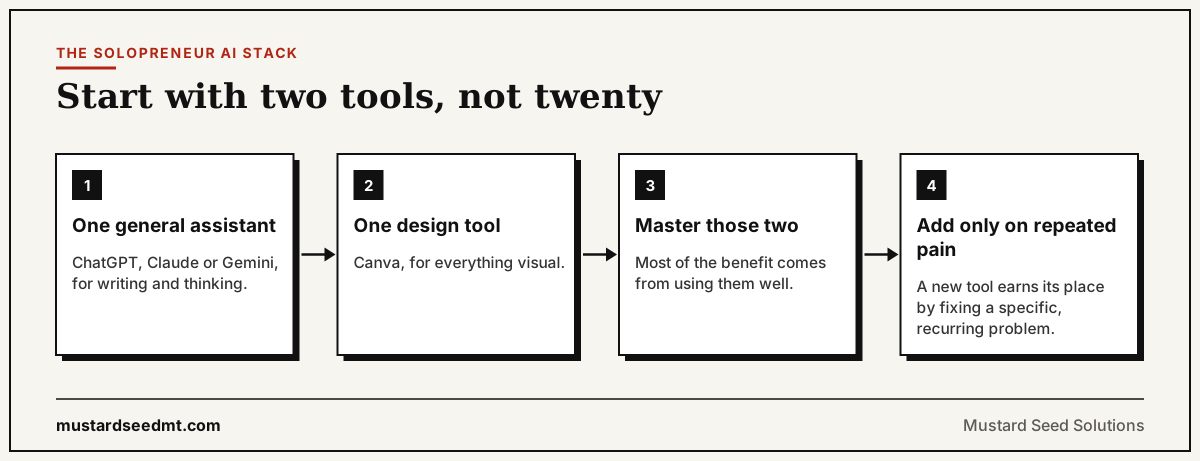
The biggest mistake solopreneurs make with AI is collecting subscriptions. You'll get most of the benefit from one general assistant (ChatGPT, Claude, or Gemini) for writing and thinking, plus one design tool like Canva. Master those, then add a tool only when you feel a specific, repeated pain.
The most common mistake is collecting subscriptions; the fix is fewer tools used well.
How to use AI without losing your edge
AI multiplies your output, and your mistakes if you're careless. Keep these rules:
Stay editor-in-chief: AI drafts, you decide on claims, offers, and facts
Never publish AI output unchecked; fact-check anything specific
Keep your voice: edit so it sounds like you, not a template
Mind privacy: don't paste confidential client data into public tools
Pick a few tools and go deep, rather than collecting subscriptions
Use AI to remove busywork, not to replace your judgment
The principle: AI is a leverage layer, not a vending machine. Use it to remove busywork so you can spend your time on the judgment, relationships, and decisions only you can make.
If you want to put this into practice on your website, our guide on building a one-person company website with AI walks through using AI across positioning, copy, and launch while you stay editor-in-chief.
Frequently Asked Questions
What are the best AI tools for solopreneurs?
The most useful stack for a one-person business covers writing (ChatGPT, Claude, or Gemini), design (Canva, Midjourney, or Firefly), admin and notes (Notion AI, Otter, Fireflies), and automation (Zapier or Make). Start with one tool per job rather than collecting many.
Can AI run my whole business?
No. AI is leverage, not autopilot. It speeds up drafting, design, and admin, but you still own strategy, relationships, claims, and final decisions. Treat it as a capable assistant you direct and check, not a replacement for your judgment.
Which AI tool should a beginner start with?
Start with one general assistant (ChatGPT, Claude, or Gemini) for writing and thinking, plus Canva for visuals. Master those before adding more. Most solopreneurs get the majority of the benefit from two or three tools used well.
Is it safe to use AI for client work?
Use it carefully. Don't paste confidential client data into public AI tools, check the data and privacy settings, and always review output for accuracy before sharing. AI is fine for drafts and ideas; you remain responsible for the final result.
Will AI content hurt my SEO?
AI-assisted content is acceptable to search engines as long as it's genuinely helpful, accurate, and original. Quality and usefulness govern rankings, not whether AI was involved. Thin, unedited AI output that helps no one is what gets penalised, not AI assistance itself.
How do I keep my voice when using AI?
Use AI for the first draft and structure, then edit heavily so it reflects your perspective, examples, and tone. Feed it samples of your writing, and always add the specifics and opinions only you have. The edit is where your voice lives.