Best Website Builders for Consultants & Coaches (2026)
For most solo consultants the answer is Squarespace: it gets you an executive-ready site with booking built in, in a day or two. Pick Carrd if you only need one page to test an offer, WordPress if publishing is your growth engine, and Wix Studio if you need custom layouts or a client portal.
That is the short version, and for a lot of people it is the whole answer. The longer version matters because the choice is not really about the builder. Your site has one commercial job — convince a qualified prospect that you understand their problem, establish authority, and make booking a conversation effortless — and every platform below can do that. What differs is how much of your time each one takes before it does.
Best Website Builder for Consultants: Quick Picks
Best overall: Squarespace. The fastest route to an executive-ready, polished site with calendar booking built in.
Best for custom layouts and client portals: Wix Studio. Total layout freedom if you need portals, intake questionnaires, or paid programs.
Best for SEO and publishing: self-hosted WordPress. The strongest option if long-term content marketing, technical SEO, and organic search are your growth engines.
Best for testing an offer: Carrd. The leanest, fastest way to put up one page for $19/year before committing to a multi-page build.
Best for online coaching with courses: Squarespace or Kajabi. See the online coaching section below.
Popular Website Builders for Consultants and Service Providers, Compared
The most popular website builders for consultants and service providers are Squarespace, Wix (and Wix Studio), WordPress, and Carrd. All four handle a services site with a booking link. They differ in setup time, yearly cost, page speed, and how far you can grow content and SEO before the platform gets in the way.
We compared each platform on real setup time, total annual cost, mobile Core Web Vitals speed, and technical SEO capabilities:
Platform
Setup Time
Annual Cost
Mobile PageSpeed
Best For
Squarespace 7.1
1–2 days
$190–$430/yr
78–88/100
Polished client-ready site with zero maintenance
Wix Studio
2–4 days
$200–$470/yr
72–84/100
Custom layouts and native client portals
WordPress (GeneratePress)
1–2 weeks
$60–$300/yr
92–99/100
Long-term SEO moat & high-volume publishing
Carrd.co
2–4 hours
$19/yr
95–100/100
Validating an offer with a 1-page booking link
In-Depth Builder Teardowns
Squarespace 7.1
Solo consultants & coaches who need a polished site with built-in booking fast
Setup:1–2 days
Est. Cost:$16–$36 / month
Speed Score:78–88 / 100
Booking:Built-in (Acuity) or embed
Strengths: Design guardrails make it nearly impossible to look amateurish; built-in scheduling, forms, and email campaigns without plugin bloat.
Trade-offs: Less customizable database logic; mobile layout requires manual grid checks in Fluid Engine.
Verdict: The default recommendation for 80% of independent advisors, executive coaches, and management consultants who sell high-ticket services.
Wix & Wix Studio
Consultants wanting total drag-and-drop freedom and specialized app workflows
Setup:2–4 days
Est. Cost:$17–$39 / month
Speed Score:72–84 / 100
Booking:Built-in Wix Bookings or app market
Strengths: Complete pixel-level freedom, deep native app ecosystem for client portals, intake questionnaires, and paid course integrations.
Trade-offs: Easy to accidentally create cluttered or slow pages if unconstrained; steep learning curve on Wix Studio.
Verdict: Best for consultants who have a specific interactive workflow (client portals, paid assessments) and want a unified all-in-one ecosystem.
WordPress (Self-Hosted + Lightweight Theme)
Content-first consultants building a long-term organic SEO and thought leadership moat
Strengths: Zero platform lock-in, infinite customization, best-in-class blogging and programmatic SEO scalability.
Trade-offs: Requires active maintenance, hosting setup, caching optimization, and security updates.
Verdict: The undisputed choice if your client acquisition strategy relies heavily on publishing 50+ in-depth guides, ranking for competitive industry keywords, or hosting custom interactive tools.
Carrd.co
New consultants testing positioning, validating offers, or keeping overhead near zero
Setup:2–4 hours
Est. Cost:$19 / YEAR (Pro plan)
Speed Score:95–100 / 100
Booking:Embed (Calendly / SavvyCal)
Strengths: Incredible value, lightning-fast load times, zero maintenance, live in an afternoon.
Trade-offs: Strictly single-page; cannot build multi-page service hierarchies or deep blog archives.
Verdict: Perfect for pre-launch consultants or boutique advisors who only need a digital business card with client testimonials and a booking link.
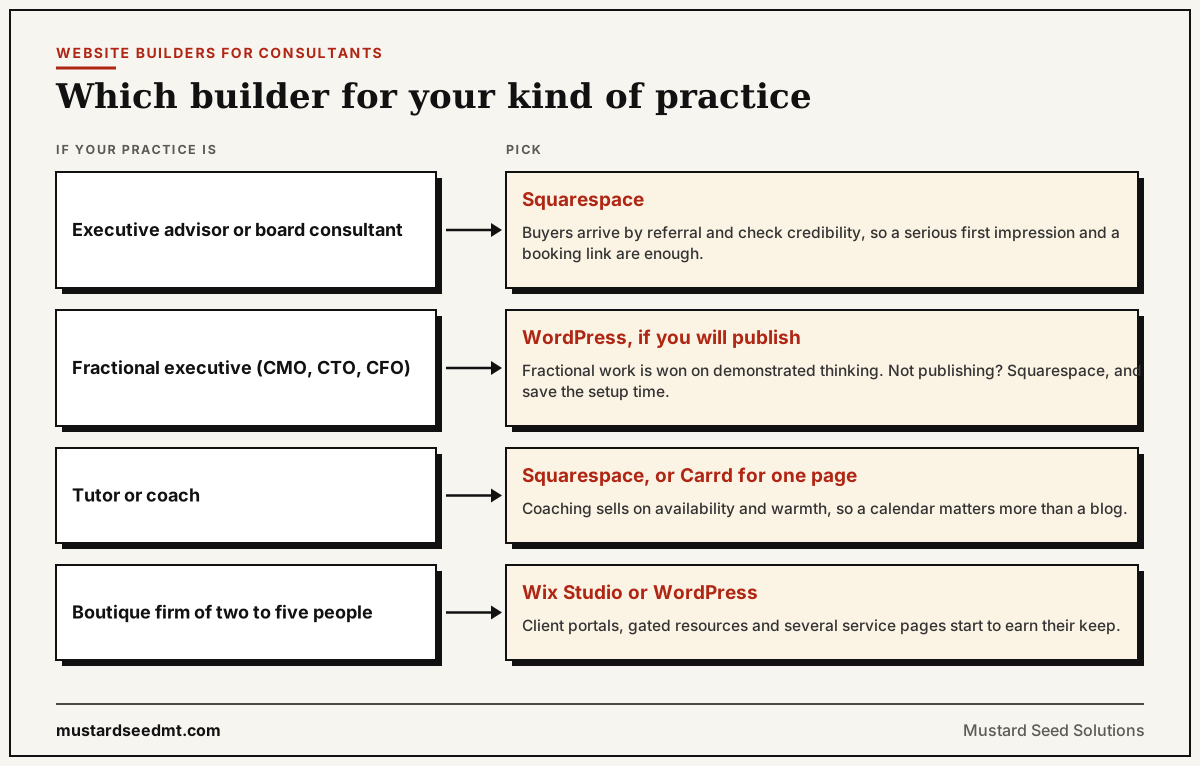
Which Builder for Your Kind of Practice
The right pick shifts depending on how you actually sell. Four common cases:
Executive advisors and board consultants. Squarespace. Your buyers arrive via referral and are checking whether you look credible, so the site is a confirmation rather than a discovery channel. Optimise for a serious first impression and a booking link, and stop there.
Fractional executives (CMO, CTO, CFO). WordPress, if you intend to publish. Fractional work is won on demonstrated thinking, and the people hiring you are reading before they call. If you are not going to publish, Squarespace and save the setup time.
Tutors and coaches. Squarespace for the built-in scheduling, or Carrd if you only need a page that explains the offer and takes a booking. Coaching sells on availability and warmth more than on depth of content, so a calendar matters more than a blog.
Boutique firms with two to five people. Wix Studio or WordPress. This is where client portals, gated resources, and multiple service pages start to earn their keep, and where a rigid template becomes the constraint.
One pattern holds across all four: the builder is rarely what limits a consulting site. Not publishing, and not making it obvious how to book, are what limit it — and no platform fixes either.
The right builder follows how you sell: referral-led practices need credibility, publishing-led practices need WordPress, small firms need room to grow.
Best Website Builder for Online Coaching
The best website builder for online coaching is Squarespace for most one-to-one coaches, because one account covers the site, Acuity Scheduling for sessions, payments, courses, and memberships. Wix is the better pick if you sell session packages and online programs. Kajabi suits coaches whose main product is a course or group program.
Online coaching asks more of a website than a consulting site does. Clients book often, pay in different ways, and may need a place to log in. Before you pick a builder, check that it covers these four jobs natively or with one clean integration:
Booking: self-serve scheduling with time zones, reminders, and a video link sent automatically.
Payments: pay-per-session, packages of sessions, and recurring billing for ongoing coaching.
Courses or programs: lessons a client works through between calls, released on a schedule if needed.
Memberships: a gated area for paying clients, such as worksheets, recordings, or a community page.
Which website builders cover booking, payments, courses and memberships for online coaches
Builder
Booking
Payments
Courses / programs
Memberships
Squarespace
Acuity Scheduling (Squarespace-owned, billed as a separate subscription)
Built in
Built in on paid plans
Built in; transaction fee on digital sales is lower on higher plans
Wix
Wix Bookings (online payment needs a paid site plan)
Built in
Wix Online Programs
Pricing Plans app for memberships and session packages
Kajabi
Coaching product with session scheduling, or a Calendly connection
One-time, subscriptions, payment plans
Core product
Built in
WordPress
Embed (Calendly, SavvyCal) or a booking plugin
Plugin (e.g. WooCommerce)
LMS plugin (e.g. LearnDash)
Membership plugin (e.g. MemberPress)
Carrd
Embed only
Checkout links or embeds
No
No
A simple rule: if most revenue comes from live sessions, choose a website builder with strong booking and add courses later. If most revenue comes from a program people work through on their own, start from a course platform like Kajabi and treat the website as its front door. Check current plan limits and fees on each vendor's pricing page before you commit, because they change often.
What a High-Converting Consulting Site Actually Needs
Enterprise buyers and corporate decision-makers do not evaluate consultant websites like consumer storefronts. They look for 7 specific credibility signals:
A frictionless 1-click booking flow (Calendly, Acuity, or SavvyCal)
Unmistakable founder credibility (headshot, authentic background, verified case studies)
Outcome-driven offer pages (solving high-stakes problems, not generic 'consulting')
Real client proof (concrete metrics, logos, and testimonials)
Fast mobile load speed (Core Web Vitals under 2.5s LCP)
Technical SEO basics (editable meta tags, clean canonicals, OpenGraph previews)
Clean visual typography that inspires confidence in enterprise buyers
The 3 Critical Traps That Derail New Consultant Sites
Spending $5,000+ on custom code before validating the offer: Custom development is hard to edit without a developer. When your positioning inevitably evolves in your first 6 months, a custom site becomes a bottleneck. Start with a flexible builder.
The generic "Services" laundry list: Listing bullet points like "Strategic Consulting, Leadership Coaching, Digital Transformation" kills conversion. Create dedicated pages for each concrete outcome you deliver (e.g., Fractional CTO for Series A FinTech, Executive Onboarding for Hospital Directors).
Hiding the founder behind corporate 'We' language: Clients buy the expert, not an imaginary 50-person firm. Feature your face, your authentic background, and named case studies on the homepage.
The 60-Second Recommendation
If you want a site live this weekend that looks executive-ready and lets prospects book calls directly: choose Squarespace. If you are building a media company around your consulting practice with 100+ technical guides: choose self-hosted WordPress.
Which Website Builder Is Best for AI Search Visibility?
Less than you would think depends on the builder. When ChatGPT, Perplexity or Copilot decide whether to quote a consultant’s site, they need three things from it: the page text present in the HTML the server sends, crawlers allowed in by robots.txt, and pages specific enough to answer a question. Squarespace, Wix, WordPress and Carrd can all deliver standard pages that way. The differences are in control and in how many pages you can sensibly build.
WordPress gives the most control: your own robots.txt, structured data through SEO plugins, and room for one page per service and per question clients ask.
Squarespace and Wix let you edit titles and descriptions and add some structured data, which is enough for most consulting sites. Check their crawler settings, because some builders and hosts offer a switch that blocks AI crawlers.
Carrd is the weakest choice for AI search, not because of how it is built but because a one-page site gives an assistant one page to quote for every question. It works as a launch page, not as the site you want recommended.
Two checks matter more than the builder. Open your live yoursite.com/robots.txt and make sure OAI-SearchBot and PerplexityBot are not blocked. Then view the source of a service page and search for a sentence from its main text; if it is missing, booking widgets or page apps are loading it with JavaScript, and some AI crawlers will not see it.
DIY Website Builder or Hire a Web Designer?
Build it yourself while the offer is still changing, the budget is tight and you are comfortable editing pages: any of the builders above will do, and you can rewrite the site every month without paying anyone. Hire help once the site is your main sales asset, when your time is worth more than the fee, or when the real problem is what the site says rather than how it looks.
That last point decides it for most consultants. A designer who only does layout will make an unclear offer look polished. If you cannot yet say in one sentence who you help and what changes for them, pay for positioning first and layout second, whoever does the building.
Mustard Seed builds consultant websites with positioning and AI-search setup included, from $600. See pricing or check your current site with the free AI Crawler Checker.
Frequently Asked Questions
Which website builder is best for AI search visibility?
Squarespace, Wix, WordPress and Carrd can all serve standard pages that AI crawlers can read. WordPress gives the most control over robots.txt and structured data; Squarespace and Wix are enough for most consulting sites. Carrd is the weakest for AI search because a one-page site has only one page to quote. Check that your robots.txt does not block AI crawlers and that your page text appears in the page source.
Should a consultant use a DIY website builder or hire a web designer?
Build it yourself while your offer is still changing and the budget is tight. Hire help once the site is your main sales asset, your time is worth more than the fee, or the real problem is what the site says rather than how it looks. A designer who only does layout will not fix an unclear offer, so sort out positioning first.
What is the best website builder for solo consultants?
For most solo consultants, Squarespace 7.1 is the easiest and most reliable path. It gives you an executive-grade aesthetic in 48 hours with built-in scheduling, SSL, and hosting, eliminating technical headaches so you can focus on client delivery.
What is the best website builder for executive coaches?
Squarespace and Wix are the co-leaders for coaches. Squarespace excels in visual elegance and integrated Acuity Scheduling for recurring client sessions. Wix is superior if you need client portals, digital product downloads, or paid webinar access.
What is the best website builder for a growing consulting business?
If your consulting business plans to scale through inbound search and published authority content, self-hosted WordPress (paired with a lightweight theme like GeneratePress or Kadence) provides the highest SEO ceiling, fastest Core Web Vitals, and total data ownership.
How much should a consultant spend on a website in 2026?
A solo consultant can launch a world-class site for $200–$500 total in year one (covering a custom domain and a premium builder plan). Investing thousands of dollars into custom development before you have verified your positioning with paying clients is the single most common mistake new consultants make.
Do consultants need a multi-page website or is a one-pager enough?
If you are starting out or rely primarily on outbound networking and LinkedIn, a one-page site built on Carrd or Squarespace is plenty. However, if you want Google and AI search engines (like ChatGPT and Perplexity) to discover and cite your specific services, you will eventually need dedicated URLs for each core offer and case study.
Should I embed Calendly or use a builder's native scheduling?
Both work well. Calendly, SavvyCal, and Cal.com embed seamlessly on any platform and allow you to keep your calendar settings consistent even if you change website hosts. Squarespace's native Acuity integration is convenient if you want all billing, forms, and appointments in one dashboard.
What is the best website builder for executive advisors?
Squarespace. Advisory work arrives by referral, so the site is confirming credibility rather than generating discovery — you need a serious first impression and an obvious way to book, not a publishing platform. Carrd works too if a single page covers it.
What is the best website builder for fractional consultants?
WordPress if you plan to publish regularly, because fractional roles are won on demonstrated thinking and buyers read before they call. Squarespace if you are not going to publish — there is no point paying the setup cost for a content engine you will not run.
What is the best website builder for tutors and coaches?
Squarespace, mainly for the scheduling built into it, or Carrd if one page explaining the offer and taking a booking is genuinely all you need. Coaching converts on availability and warmth more than on depth of content, so the calendar matters more than the blog.
What is the best website builder for online coaching?
Squarespace for most online coaches who sell one-to-one sessions, because it pairs a polished site with Acuity Scheduling, payments, courses and memberships in one account. Choose Wix if you want bookings, session packages and online programs inside one editor, or Kajabi if courses and group programs are the main product and the website is secondary.
Turn your consulting website into a qualified client pipeline
Mustard Seed helps consultants, coaches, and boutique tech firms sharpen their positioning, build high-converting websites, and achieve AI search visibility.